
“汉诺塔”是一个由数学家爱德华·卢卡斯于1883年发明的一个非常著名的游戏。游戏的内容是,有三根细柱(A,B,C),A柱上套着6个圆盘。这些圆盘大小各异,按从大到小的顺序自下而上摆放。如下图所示。

(图上白色黑框的代表圆盘)
现在要把套在A住上的6个圆盘全部移到B柱上。并且在移动圆盘时须遵守下述规则:
- 一次只能移动柱子最上端的一个圆盘。
- 小圆盘上不能放大圆盘。
将1个圆盘从一根柱子移到另一根柱子,算移动“1次”。那么,将6个圆盘全部从A移到B需要移动几次呢?(大家可以先默想一下)
让我们来看看C语言编写的解法程序吧,这是一个递归的调用:
void hanoi(int n, char x, char y, char z) {
  if (n == 0) {
    /* 什么也不做 */
   } else {
    hanoi(n-1, x, z, y);
    printf("%c->%c, ", x, y);
    hanoi(n-1, z, y, x);
   }
}

int main(void) {
  hanoi(6, 'A', 'B', 'C');
  return EXIT_SUCCESS;
}
上面的程序会正确的输出“6层汉诺塔”的解决步骤。hanoi 就是核心了,不过上面的C代码并不能直观的显示移动的过程,所以我特别用delphi写了一个小程序,用来做演示。
type
  // 用于存放指定轴上第n次移动时圆盘的数量与编号
  THanoiValue = record
    Start: Integer;
    procedure Push(V: Byte);
    function Pop(): Byte;
    function Count: Integer;
    function Get(Index: Integer): Byte;
  end;

  // 记录每次移动后的状态,以便动画显示
  THanoiList = array of THanoiValue;

  // 汉诺塔模拟移动
  THanoi = class(TObject)
  const
    SPACE = 24;
  private
    FCS: TCanvas;
    FTimer: TTimer;
    FIndex: Integer;
    FLayerCount: Integer;
    FAxis: array of THanoiList;
    FLayerWidth: array of Integer;
    FW, FH: Integer;
    FXx, FYx, FZx, FIW: Integer;
    function GetInterval: Cardinal;
    procedure SetInterval(const Value: Cardinal);
  protected
    procedure Init();
    procedure Hanoi(n: Integer; X, Y, Z: Integer);
    procedure DoTimer(Sender: TObject);

    procedure DoDrawBackground();
    procedure DoDrawItem(AIndex: Integer);
    procedure DoDraw();
  public
    constructor Create(CS: TCanvas);
    destructor Destroy; override;
    procedure Start;  // 开始演示
    procedure Stop;   // 停止演示
    // 演示速度
    property Interval: Cardinal read GetInterval write SetInterval;
    // 几层圆盘? 本示例最多支持7层,受限于THanoiValue的定义,需要更多的话请你改进它
    property LayerCount: Integer read FLayerCount write FLayerCount;
  end;


{ THanoi }

constructor THanoi.Create(CS: TCanvas);
begin
  FCS := CS;
  FTimer := TTimer.Create(frmMathTool);
  FTimer.Enabled := False;
  FTimer.Interval := 1000;
  FTimer.OnTimer := DoTimer;
end;

destructor THanoi.Destroy;
begin
  Stop();
  FreeAndNil(FTimer);
  inherited;
end;

procedure THanoi.DoDraw;
begin
  DoDrawBackground();
  DoDrawItem(0);
  DoDrawItem(1);
  DoDrawItem(2);
  FCS.Font.Size := 14;
  FCS.Brush.Color := clWhite;
  FCS.TextOut(10, 6, Format('%d/%d', [FIndex, High(FAxis[0])]));
end;

procedure THanoi.DoDrawBackground;
var
  R: TRect;

  procedure DrawAxis(AOffset: Integer; const AName: string);
  begin
    FCS.Brush.Color := clMaroon;
    R.Left := AOffset + (FIW - 12) shr 1;
    R.Right := R.Left + 12;
    R.Top := 40;
    R.Bottom := FH - SPACE;
    FCS.FillRect(R);
    FCS.Brush.Color := clWhite;
    FCS.TextOut(R.Left, 6, AName);
  end;

begin
  FCS.Brush.Color := clWhite;
  FCS.FillRect(FCS.ClipRect);

  FCS.Brush.Color := clDkGray;
  SetRect(R, FXx, FH - SPACE, FXx + FIW, FH - 6);
  FCS.FillRect(R);
  SetRect(R, FYx, FH - SPACE, FYx + FIW, FH - 6);
  FCS.FillRect(R);
  SetRect(R, FZx, FH - SPACE, FZx + FIW, FH - 6);
  FCS.FillRect(R);

  FCS.Font.Size := 16;
  DrawAxis(FXx, 'A');
  DrawAxis(FYx, 'B');
  DrawAxis(Fzx, 'C');
end;

procedure THanoi.DoDrawItem(AIndex: Integer);
const
  LH = 24;
var
  X, Y, I, W: Integer;
  V: THanoiValue;
  R: TRect;
begin
  V := FAxis[AIndex][FIndex];
  if V.Count = 0 then Exit;
  case AIndex of
    0: X := FXx;
    1: X := FYx;
    2: X := FZx;
  else
    Exit;
  end;
  Y := FH - SPACE;
  FCS.Brush.Color := clWhite;
  for I := 0 to V.Count - 1 do begin
    W := FlayerWidth[V.Get(i) - 1];
    R.Left := X + (FIW - W) div 2;
    R.Right := R.Left + W;
    R.Top := Y - LH;
    R.Bottom := Y;
    Dec(Y, LH);
    FCS.Rectangle(R);
  end;
end;

procedure THanoi.DoTimer(Sender: TObject);
begin
  if FIndex > High(FAxis[0]) then
    FTimer.Enabled := False
  else begin
    DoDraw();
    Inc(FIndex);
  end;
end;

function THanoi.GetInterval: Cardinal;
begin
  Result := FTimer.Interval;
end;

procedure THanoi.Hanoi(n, X, Y, Z: Integer);
begin
  if n > 0 then begin
    Hanoi(n - 1, x, z, y);

    FAxis[y][FIndex].Start := FAxis[y][FIndex - 1].Start;
    FAxis[x][FIndex].Start := FAxis[x][FIndex - 1].Start;
    FAxis[z][FIndex].Start := FAxis[z][FIndex - 1].Start;

    FAxis[y][FIndex].Push(FAxis[x][FIndex].Pop);

    Inc(FIndex);
    Hanoi(n - 1, z, y, x);
  end;
end;

procedure THanoi.Init;
var
  I, J: Integer;
begin
  I := (2 shl (FLayerCount - 1));
  if Length(FAxis) < 3 then begin
    SetLength(FAxis, 3);
    SetLength(FAxis[0], I);
    SetLength(FAxis[1], I);
    SetLength(FAxis[2], I);
    FillChar(FAxis[0][0], i * 4, 0);
    FillChar(FAxis[1][0], i * 4, 0);
    FillChar(FAxis[2][0], i * 4, 0);
    for i := 1 to FLayerCount do
      FAxis[0][0].Push(I);
    FIndex := 1;
    Hanoi(FLayerCount, 0, 1, 2);
  end;
  FIndex := 0;

  FW := FCS.ClipRect.Right - FCS.ClipRect.Left;
  FH := FCS.ClipRect.Bottom - FCS.ClipRect.Top;

  FIW := Round((FW - SPACE * 4) / 3);
  SetLength(FLayerWidth, FLayerCount);
  J := Round(FIW * 0.8 / FLayerCount);
  for I := 0 to FLayerCount - 1 do
    FLayerWidth[i] := FIW - (I + 1) * J;
  FXx := SPACE;
  FYx := FXx + FIW + SPACE;
  FZx := FYx + FIW + SPACE;
  DoDrawBackground();
end;

procedure THanoi.SetInterval(const Value: Cardinal);
begin
  FTimer.Interval := Value;
end;

procedure THanoi.Start;
begin
  Init;
  FTimer.Enabled := True;
end;

procedure THanoi.Stop;
begin
  FTimer.Enabled := False;
  Init;
end;

{ THanoiValue }

function THanoiValue.Count: Integer;
var
  I: Integer;
begin
  Result := 0;
  I := Start;
  while (Result < 10) and (I and $7 > 0) do begin
    Inc(Result);
    I := I shr 3;
  end;
end;

function THanoiValue.Get(Index: Integer): Byte;
var
  I, K: Integer;
begin
  Result := 0;
  I := Start;
  K := 0;
  while K < 8 do begin
    Result := I and $7;
    if Result > 0 then begin
      if K = Index then
        Break;
      I := I shr 3;
      Inc(K);
    end else
      Break;
  end;
end;

function THanoiValue.Pop: Byte;
var
  I, J, K: Integer;
begin
  Result := 0;
  I := Start;
  K := 0;
  while K < 8 do begin
    J := I and $7;
    if J > 0 then begin
      Result := J;
      I := I shr 3;
      Inc(K);
    end else begin
      if Result > 0 then
        Start := Start and (not ($7 shl ((K - 1) * 3)));
      Break;
    end;
  end;
end;

procedure THanoiValue.Push(V: Byte);
var
  I, K, L: Integer;
begin
  I := Start;
  L := V;
  K := 0;
  while K < 8 do begin
    if (I and $7) > 0 then begin
      I := I shr 3;
      L := L shl 3;
      Inc(K);
    end else begin
      Start := Start or L;
      Break;
    end;
  end;
end;
使用 THanoi 可以动态的演示移动过程,我的程序运行效果如下:
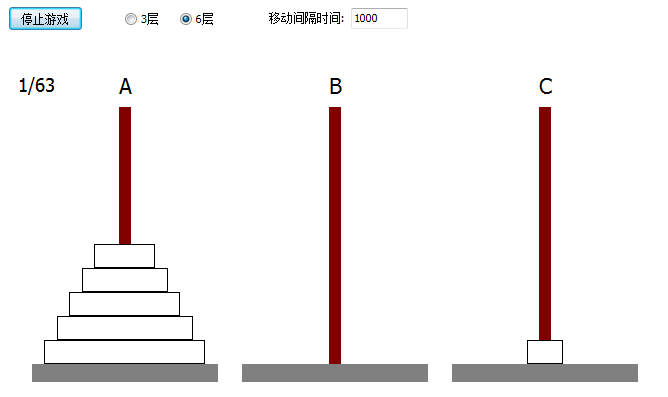
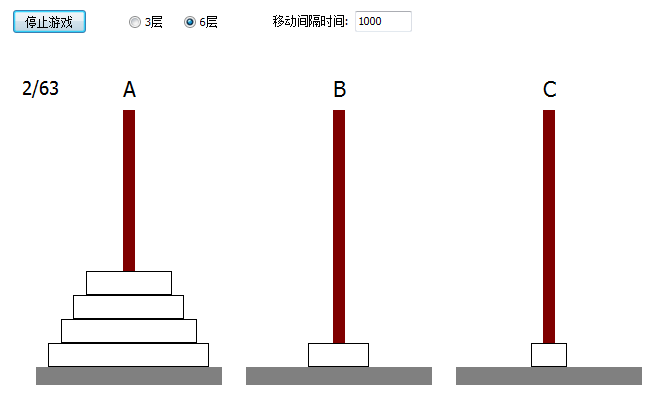
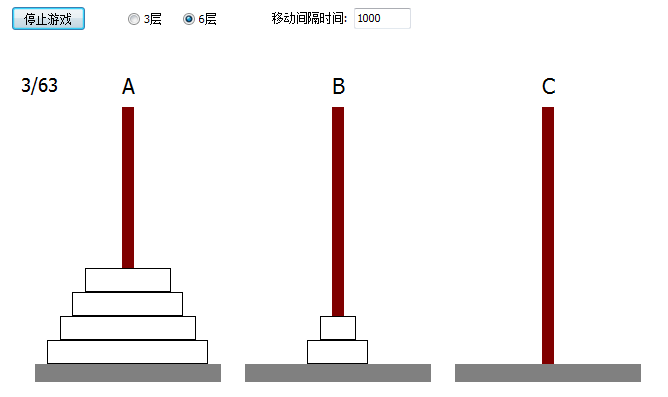
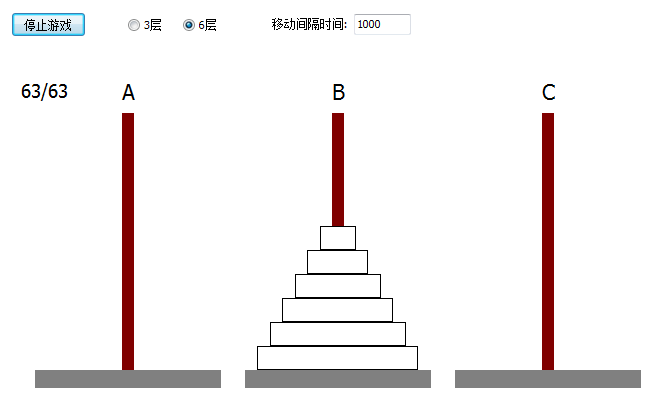
在上面的演示程序中,是先将整个移动过程计算好后保存起来,然后用定时器动画显示的。THanoiValue 的作用很关键,它记录了每次移动后在一个轴上的圆盘数量和大小(编号),这样才可以准确的画图展示移动过程。